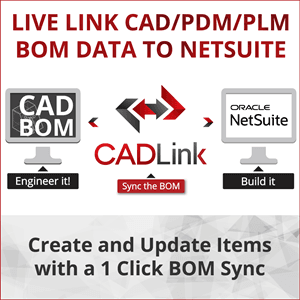
CADLink - CAD BOM to NetSuite Integration
With 20+ years of experience in CAD-ERP integration, QBuild’s CADLink is a turnkey system designed to tightly connect our customer CAD/PDM/PLM design information to NetSuite. CADLink uses a real-time bidirectional link to pull and push your BOM product data in a single click. Create items, draw comparisons, highlight discrepancies, and change two different data sets in one interface and in minutes! Reduce costly mistakes, eliminate manual entry, and synchronize NetSuite and CAD/PDM/PLM Bill of Materials (BOM) in an organized and controlled way. CADLink is compatible with Altium, AutoDesk, AutoCAD Mechanical, AutoCAD Electrical, AutoCAD Architecture, AutoCAD LT, Eagle, Inventor, Revit, Cabinet Vision, Catia, Draftsight, EPLAN, Intergraph, CADWorx, Kubotek, Mentor Graphics, Microvellum, OrCAD, PTC Creo, PTC Pro-E, Onshape, Siemens Solid Edge, Siemens NX, Siemens Teamcenter, SOLIDWORKS, SOLIDWORKS PDM Professional, SpaceClaim, TEKLA and more. CADLink launches right out of CAD/PDM/PLM system and allows Design Engineers to regain lead time and do what they do best...design!
Screenshots
Overview
Integrate & Sync CAD BOM Data Directly To NetSuite In One Easy Interface
CADLink lets your engineers create Assembly Items with manufacturing BOM structure and Inventory Items in NetSuite that are identical to your CAD models. Just one click away. If you’re looking for a SOLIDWORKS NetSuite Integration, Inventor NetSuite Integration, or AutoCAD NetSuite Integration, no matter which CAD, PDM, or PLM System you use, CADLink can be the link between NetSuite and your design data.
Key Benefits
- CADLink uses a real-time, bidirectional link to pull and push information from your NetSuite Inc systems and CAD.
- Create items, draw comparisons, highlight discrepancies, and change two different ERP data sets in one interface.
- Reduce costly mistakes and synchronize your CAD and ERP Bill of Materials in an organized and controlled way.
Eliminate Duplicate Manual Data Entries
CADLink’s single-step process eliminates duplicate manual data entries of engineering data.
- Badge
- Integrated
- Compatible with
- NetSuite
- Countries
- Afghanistan, Argentina, Austria, Belgium, Brazil, Canada, Chile, China, Czechia, Denmark, Estonia, Finland, France, Germany, India, Japan, Korea (the Republic of), Lithuania, Luxembourg, Mexico, Netherlands, New Zealand, Oman, Philippines, Portugal, Romania, Saudi Arabia, Singapore, Slovenia, South Africa, Spain, Sweden, Switzerland, United Arab Emirates, United Kingdom, United States, Viet Nam
- Languages
- Chinese, English, French, German, Japanese, Russian, Spanish
- First available
- 3/24/2016
Compare CADLink - CAD BOM to NetSuite Integration with
Similar in Integration & iPaaS
View all
Boomi Integration Accelerator for Salesforce
Boomi
Integration between Salesforce & NetSuite
Patchworks eCommerce iPaaS
Patchworks Media Ltd
Oracle NetSuite and Patchworks enable seamelss integration between NetSuite and ecommerce platforms like (but not limited to) Shopify, BigCommerce, commercetools, Adobe Commerce (Magento), Commerce layer, Shopware, and OroCommerce. Patchworks also integrates Netsuite with other retail systems such as PIMs, OMS, WMS, POS, CRM and CDP.

CADLink - CAD BOM to NetSuite Integration